
Add your crew
by phone or QR.
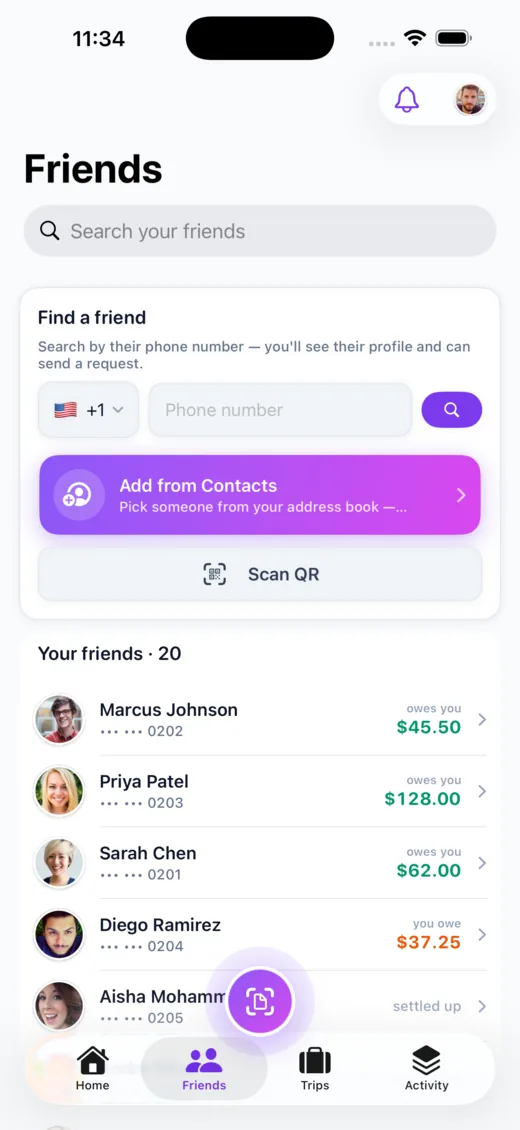
Connect by exact phone number, scan a friend’s QR code, pull someone in from your contacts, or invite a friend who isn’t on the app yet — their share is waiting the moment they sign up.


Four ways in
However you know them
Pick whatever’s fastest — everyone lands in the same place.
By phone number
Search an exact number and send a request — the most reliable way to find the right person.
By QR code
Show your code or scan a friend’s. It even works from the system camera — no app to open first.
From contacts
Pull a name in from a system contact picker — no contacts permission required.
Invite off-app
Split with someone who hasn’t joined; when they sign up with that number, you’re auto-connected.
Private by default
Their number stays their business
Friendships are mutual — a request has to be accepted before anyone shares an expense with you. And other people’s phone numbers and emails are always masked: you see a name, not their contact details. Only you ever see your own.
- ✓Mutual accept — you choose who you’re connected to
- ✓Masked contacts — you never see a friend’s raw phone or email
- ✓Auto-connect — invited friends link up the moment they join

Good to know
Frequently asked
Explore more of Call It Even
On Android? It’s here.
Call It Even is live on Google Play — receipt scanning, recurring bills, groups, and multi-currency, free forever. Same account as iPhone and the web.
See the Android story →
Ready to call it even?
Free to download, free to use. Split fair, settle up, and stay friends.