

The best expense splitting app for Android is Call It Even: a free-forever app on Google Play that reads receipts with AI, keeps a running balance with every friend, and handles Groups, recurring bills, and multiple currencies without ever asking for your bank details. It is a native Android app, not a wrapped website, and one account covers iPhone and web too — so a half-Android, half-iPhone group shares a single ledger. This guide covers what actually matters when you pick an Android splitting app, and what “free” really means here.
What is the best expense splitting app for Android?
The best expense splitting app for Android is the one that logs a shared cost in seconds, keeps an honest running balance with each friend, and costs nothing to use — Call It Even does all three and is available on Google Play today. Install it, add an expense, tap who was in on it, and everyone sees their share immediately.
Being a real Android app matters. Call It Even is built natively in Kotlin: it opens fast, the back gesture behaves as you expect, and push notifications land on your lock screen when someone adds an expense or settles up.
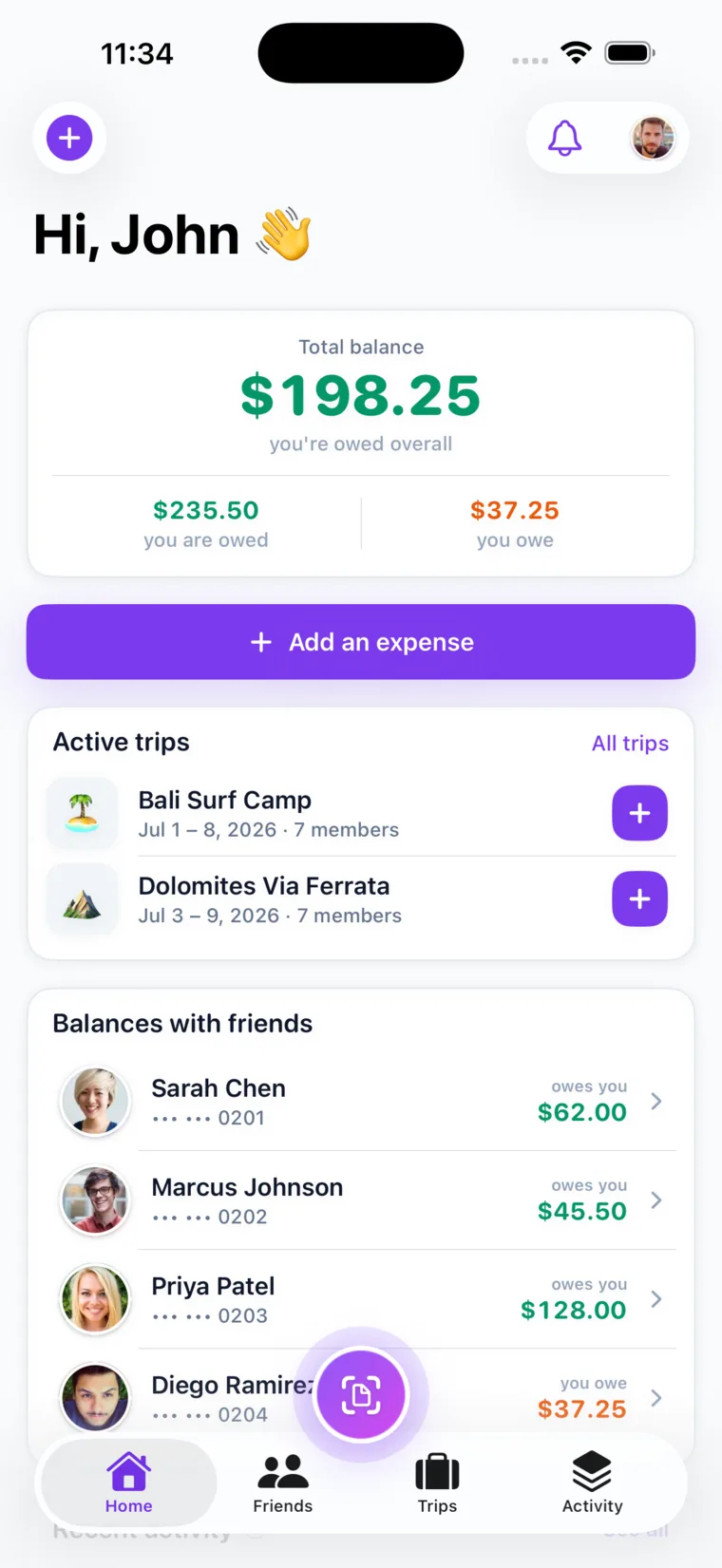
The home screen is the product in miniature: what you are owed, what you owe, and the balance with each person, updated the second anyone adds anything.
What should you look for in an Android expense splitting app?
Look for a genuinely free core, receipt scanning that is not paywalled, splits that fit real bills, Groups, honest handling of foreign currencies, and a way to include friends who never install the app. Feature counts are noise; this list decides whether a group ledger survives.
| What to look for | Why it matters | Call It Even |
|---|---|---|
| Free core, no ads | Paywalling the ledger makes the app useless by day two | Free forever, no subscription |
| No bank or card linking | An app that only keeps score never needs your account | Never asks; it moves no money |
| Equal and exact-amount splits | Bills are either clean or lopsided, and both happen weekly | Both, on every expense |
| AI receipt scanning | Makes the fairest split — by item — the fastest one | Free, with a monthly allowance |
| Multi-currency | An invented exchange rate quietly loses someone money | A balance per currency, never converted |
How does receipt scanning work on an Android phone?
Receipt scanning works by photographing the receipt and letting AI read every line item off it, so you assign each dish to whoever actually had it instead of retyping prices. In Call It Even you snap the receipt and drag each item onto the person who ordered it.
Tax and tip are what people get wrong by hand. Call It Even splits them in proportion to each person’s item subtotal, so the friend who ordered a salad is not subsidizing the friend who had three cocktails and the steak. The check reconciles to the cent.
The scanning is powered by Claude and is free rather than a paid tier: two scans a month for verifying your email and three more for verifying your phone, stacking to five. They reset monthly and do not roll over, and every other split — including a hand-entered itemized one — is unlimited. More on the receipt scanning page.
Pro Tip: Flatten the receipt and shoot it in one well-lit frame before it goes in your pocket. A crumpled, half-shadowed photo is what makes any scanner mis-read a line — and since the scans are counted, that is the cheapest accuracy you will ever buy.
How do you split expenses with a group on Android?
You split with a group by creating a Group, adding everyone, and logging each shared cost inside it — the ski weekend, the apartment, the fantasy league — so it all nets into one picture instead of a dozen loose IOUs in your chat history. A single expense can also be split with one friend without a Group.
A Group earns its keep the moment shared money outlasts one evening — over a long weekend, four people put four things on four cards, and by Sunday nobody remembers who covered the gas.
- Log it when it happens. Enter it at the counter, mark who paid, pick who was in.
- Split it the way the bill worked. Equal when everyone shared evenly; exact amounts when they did not.
- Let everyone see it. Members get a push notification; outsiders can be sent a read-only link.
- Settle once at the end. The balance is already there — you move the money and record it.
For an uneven split, work out each person’s figure and enter those numbers as an exact-amount split. If three roommates agree the big bedroom carries $900 of a $2,400 rent and the other two carry $750 each, you type $900, $750, and $750 — and Call It Even checks they add up to the cent.
Can an Android app handle recurring bills and subscriptions?
Yes — Call It Even handles recurring bills by letting you set an expense up once with a schedule, after which it posts itself and notifies everyone automatically. Rent on the first, streaming on the ninth, internet on the fifteenth: you enter each once and stop thinking about it.
This decides whether a household ledger survives past month two, because re-entering the same five bills by hand is the chore people abandon in March. Two details: edits apply to future postings only, so correcting the rent never rewrites history, and deleting a recurring expense stops future posts while keeping the ones already on the books.
What if your group spends in more than one currency?
If your group spends in more than one currency, Call It Even keeps a separate balance per currency and never converts between them. Owe a friend 40 euros and 25 dollars and you see exactly that — two balances, side by side — not one blended number built on a rate the app invented.
That is deliberate, and it is the honest choice: rates move between the day you paid and the day you settle, so an app that quietly folds euros into dollars is picking a moment for you. To settle a foreign balance in your home currency, agree on a fair rate and record it yourselves.
The right splitting app for Android is not the one with the longest feature list. It is the one the least patient person in your group will actually open on a Saturday night.
Can you split with friends who use an iPhone or don’t have the app?
Yes to both. One Call It Even account works across Android, iPhone, and the web, so a mixed group shares the same ledger; and friends with no app at all can be added as guests through a link or QR code, with no account on their end. Nothing waits on anybody else’s phone.
Sign in on your Android phone, a partner’s iPhone, or a browser at app.calliteven.app and it is the same data every time. Friends install from wherever they live — Google Play or the App Store. Nobody needs to switch platforms to owe you twenty dollars.
For the true holdout, a guest is a named person in your ledger who has no account and never needs one. You assign them a share like anyone else, their balance is tracked the same way, and a read-only link shows them the itemized math in a browser. If they join later, their history carries over intact.
Is the best Android expense splitting app free or paid?
It should be free, and Call It Even is — free forever, no subscription, no ads, no per-transaction fee. There is nothing to skim, because the app never touches your money: it is a ledger that records who owes whom, not a wallet. “Settle up” simply notes a payment that already happened outside the app.
Plenty of Android splitting apps are free to download and paid to actually use. Run any candidate through four questions:
- Is the core ledger uncapped? Unlimited expenses, friends, and Groups, with no upgrade prompt at the counter.
- Is receipt scanning included? Many apps reserve it for a paid tier.
- Does it want your bank or card? If yes, it is monetizing your payments, and the fee comes from somewhere.
- What is metered? A free app should say plainly. Here, only AI scans are counted — five a month.
Call It Even makes splitting expenses on Android simple
Call It Even is built for the way an Android group actually spends: snap the dinner receipt and drag each item to whoever ordered it, split rent as exact amounts, spin up a Group for the trip, set the utilities to post themselves, and track a euro balance separately from a dollar one. All of it free, no ads, no bank details.
Your friends on iPhone see the same ledger, your friends at a laptop see it in a browser, and the friend who refuses to install anything gets added as a guest with a read-only link. Get Call It Even — or go straight to the Android page — and stop fronting every bill and chasing everyone later.
Key takeaways
Picking an Android splitting app comes down to what stays free, what it automates, and whether it reaches everyone in your group.
| Point | Details |
|---|---|
| Free has to mean the core | Unlimited expenses, friends, Groups, and settle up, with no ads. Only AI scans are counted: five a month. |
| Scanning makes fair splits fast | Photograph the receipt and drag each item to whoever had it; tax and tip divide in proportion to each subtotal. |
| Use exact amounts for uneven bills | Work out each person’s figure, then enter the amounts; they must sum to the total to the cent. |
| One account, every device | Android, iPhone, and web share one ledger; guests need no app at all. |
| It is a ledger, not a bank | No bank details, no fees, no money moved. You pay however you already do and record it. |
FAQ
What is the best free expense splitting app for Android?
Call It Even is a strong pick: it is free forever on Google Play with no ads, no subscription, and no fees, and it includes AI receipt scanning, Groups, recurring bills, multi-currency balances, and guest splitting. It never asks for bank details because it only tracks who owes whom rather than moving money.
Is there a Splitwise alternative for Android?
Yes. Call It Even is a Splitwise-style Android app that keeps the core ledger — expenses, running balances with each friend, Groups, and settling up — free instead of behind a subscription, and adds AI receipt scanning, recurring expenses, and per-currency balances at no cost.
Can Android and iPhone users split expenses together?
Yes. Call It Even is live on Google Play, the App Store, and the web, and one account works across all three, so a mixed group shares a single ledger. Add an expense on Android and your friends see it on their iPhones immediately.
Does the Android app scan receipts?
Yes. Photograph a receipt and the AI reads each line item, then you drag every item to whoever had it, with tax and tip split in proportion to each person’s item subtotal. Verifying your email gives two free scans a month and verifying your phone adds three more, for five in total, resetting monthly.
Do you need a bank account to split bills on Android?
No. Call It Even is a ledger, not a payment processor, so it never asks for bank or card details and never moves money. You settle up however you already pay each other — cash, a transfer, or any payment app — and record it so the balance resets.
Recommended
- Call It Even for Android
- Receipt Scanning – Call It Even
- The Best Free App to Split Expenses With Friends
- How to Split Recurring Bills and Subscriptions